MostBet Mobile Application: Installation Sources, Technical Requirements, and Functional Overview
The MostBet mobile application provides native access to the platform's sportsbook, casino inventory, payment gateway, and account management tools on Android and iOS devices. This guide outlines the official installation methods, supported device specifications, and a factual inventory of in‑app features. It does not constitute a recommendation to download or wager.
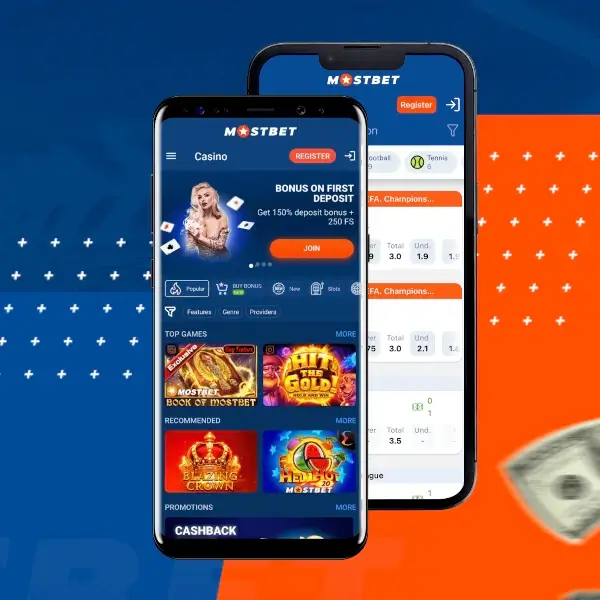
What the MostBet Application Is (and Is Not)
The MostBet mobile application is a standalone software client developed for Android and iOS operating systems. It connects to the same backend infrastructure as the main website and mirrors its core functionality.
From a technical perspective, the app offers two primary advantages over a mobile browser: local caching of interface assets for reduced loading times, and the ability to receive push notifications if enabled by the user.
Factual characteristics of the application:
- Supports full account lifecycle: registration, identity verification (KYC), deposits, gameplay, and withdrawal requests.
- Allows seamless switching between the sportsbook and casino verticals within a single session.
- Push notifications are configurable and may be used for event reminders or promotional alerts, subject to user consent.
Security Considerations and Source Verification
The security of any gambling application is contingent on obtaining the installation file from a verified, official source. Third‑party app stores or modified APK files introduce significant risk, including credential theft or altered game logic.
Before proceeding with installation, users should independently confirm:
- The download link originates from an official MostBet domain (mostbet.com) or a verified mirror explicitly listed by the operator.
- The permissions requested by the application align with its stated functionality (network access, optional storage for caching, and notification services).
- The application version is current. Updates are typically distributed through the same official channel, not through platform app stores for gambling content.
Android Installation Procedure and Prerequisites
Due to Google Play Store policies regarding real‑money gambling applications in many regions, the MostBet Android client is distributed as a standalone APK (Android Package Kit) file. This file must be downloaded directly from the operator's website and manually installed.
Installation sequence:
- Navigate to the official MostBet website using the link provided on this page.
- Locate the section designated for mobile applications (typically found in the footer or a dedicated menu).
- Select the Download for Android option to initiate the APK download.
- Before opening the file, ensure your device settings permit installation from "Unknown sources" or the specific browser used for the download. This is a standard Android security prompt for non‑Play Store applications.
- Open the downloaded APK file and follow the system prompts to complete the installation.
Minimum technical specifications (as stated by operator):
- Operating system: Android 5.0 (Lollipop) or a more recent version
- Storage: Approximately 50 MB of free space for the base application (additional cache may accumulate)
- Connectivity: A stable internet connection (3G minimum; Wi‑Fi recommended for live streaming features)
Functional Inventory: What the Application Contains
The following is a factual list of features accessible through the MostBet mobile application, based on the operator's public descriptions.
Sportsbook Module
- Access to pre‑match and in‑play betting markets across a variety of sports
- Integrated match trackers and basic statistical visualisations
- One‑click and quick bet configuration options
Casino Module
- Access to the aggregated library of slot games, table games, and live dealer tables
- Availability of demo (free‑play) versions for a subset of the game portfolio, subject to provider restrictions
Financial Transactions
- Initiation of deposit and withdrawal requests using the methods available in the user's region
- Viewable transaction history and current balance
- Method availability and processing limits are determined by the user's country of registration and verification status
Account Administration
- Profile management and personal data updates
- Interface for submitting KYC verification documents
- Language and odds format selection
- Access to responsible gambling tools (deposit limits, session reminders) as provided by the platform
Comparative Analysis: Native App vs. Mobile Browser Access
| Functional Attribute | Native App (Android/iOS) | Mobile Web Browser |
|---|---|---|
| Local caching of UI assets | Yes (reduces subsequent load times) | No (depends on browser cache policies) |
| Push notification capability | Yes (opt‑in required) | No (unless browser supports web push, typically not enabled) |
| Installation prerequisite | Yes (manual APK or App Store download) | No (instant access via URL) |
| Persistent device storage usage | Yes (approx. 50MB + cache) | Minimal (primarily cookies and cached images) |
| Compatibility with any modern browser | No (requires specific OS version) | Yes (platform‑agnostic) |
The choice between the native app and the mobile website depends on user preference regarding notifications, storage footprint, and tolerance for manual update procedures.
MostBet Mobile Application - Common Inquiries
Is there a cost associated with downloading the MostBet application?
The application file itself is provided without charge by the operator. Standard data usage fees from your mobile carrier may apply during the download process and subsequent use.
Are separate registration credentials required for the mobile app?
No. A single MostBet account is valid across all access points: desktop website, mobile website, and the native mobile applications. Login credentials and account balances are synchronised in real time.
Can financial transactions (deposits and withdrawals) be processed entirely within the app?
Yes, the application provides an interface for initiating both deposit and withdrawal requests. The specific payment methods available, along with their respective limits and processing times, are subject to the user's verified country of residence and the operator's current terms of service.
Access official MostBet website
 download apk
